
Format basics
M3U vs M3U8: What's the Difference?
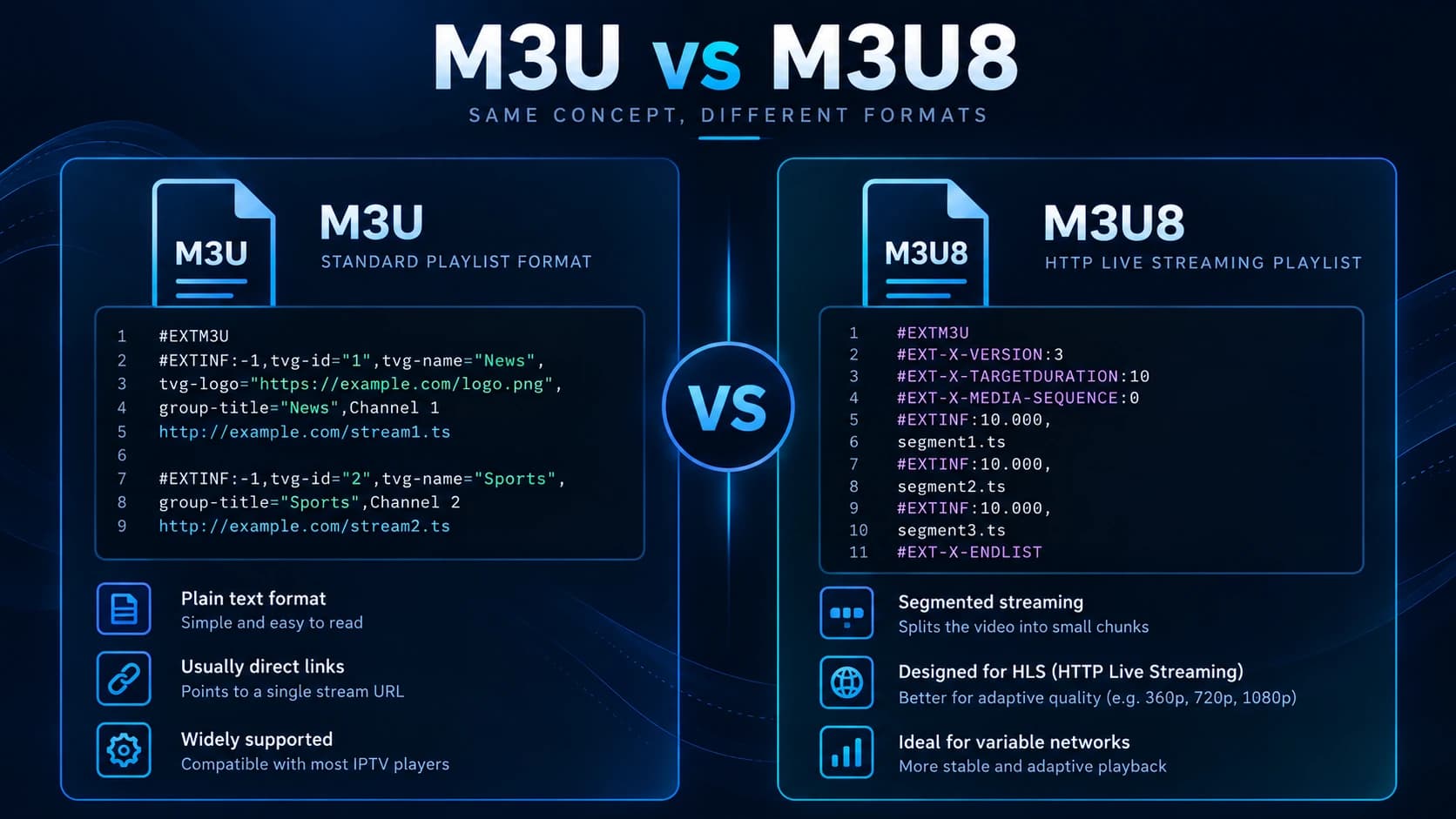
M3U and M3U8 are closely related text playlist forms. The most useful distinction for everyday playlist work is that M3U8 identifies UTF-8 text, while M3U is the broader playlist name; M3U8 is also widely used for HTTP Live Streaming playlists.
What is M3U?
M3U is a text-based playlist convention used to list media locations and optional metadata. A compatible player reads the entries and attempts to open the referenced resources.
What is M3U8?
M3U8 identifies an M3U-style playlist encoded as UTF-8. UTF-8 makes it suitable for playlist text containing international characters, accents, and non-Latin scripts.
M3U8 is also widely used for HTTP Live Streaming (HLS), where the playlist contains HLS-specific tags and references to media segments or other playlists. In that context, the playlist syntax is defined by the HLS specification.
M3U vs M3U8 at a glance
M3U and M3U8 describe the same basic playlist idea with one decisive difference: M3U8 identifies UTF-8 encoded text, while the .m3u extension alone makes no promise about encoding. That distinction matters most for titles, folders, and metadata containing accents or non-Latin scripts, which render predictably in UTF-8 and may garble otherwise. M3U8 is also the standard playlist form for HTTP Live Streaming: RFC 8216, the specification defining HLS playlist syntax, states that HLS playlists are UTF-8 text, so master playlists pointing to variants and media playlists describing segments both use the .m3u8 extension. The suffix alone proves nothing, however — a general UTF-8 playlist and an HLS media playlist can share it while obeying different specifications. Inspect the contents instead: tags such as #EXT-X-STREAM-INF signal streaming semantics, while plain channel entries signal an ordinary playlist. Neither form grants access to restricted media.
- M3U: general text playlist name; encoding is not specified by the extension alone.
- M3U8: UTF-8 text playlist; commonly used for HLS playlists.
- Both can describe media locations, but HLS M3U8 playlists contain protocol-specific tags and rules.
- Neither extension grants access to protected or restricted media.
| Aspect | M3U | M3U8 |
|---|---|---|
| Name | General text-playlist name | UTF-8 text playlist |
| Encoding signal | Extension alone promises nothing | Extension declares UTF-8 text |
| HLS role | Not an HLS playlist form | Standard form for HLS master and media playlists (RFC 8216) |
| When to use | Everyday playlists in any supported encoding | New playlists with international characters, or HLS workflows |
Why is M3U8 common with HLS?
HLS uses playlists to describe media presentations. RFC 8216 specifies HLS playlist syntax and states that HLS playlists are UTF-8 text. HLS playlists can be master playlists that point to variants or media playlists that describe media segments.
That is why an .m3u8 URL is often associated with streaming, but not every M3U8 file is automatically an HLS stream. Inspect the contents and source when the distinction matters.
Does renaming M3U to M3U8 fix a playlist?
No. Changing the extension does not convert the contents or change their encoding. A player still needs valid playlist syntax, compatible media, and any required access permissions.
How to tell an ordinary playlist from HLS
The filename alone is not enough to identify an HLS workflow. Inspect the playlist contents and the source documentation when the distinction matters.
An HLS master playlist commonly contains variant references and tags such as #EXT-X-STREAM-INF. An HLS media playlist commonly contains segment references and tags such as #EXT-X-TARGETDURATION and #EXTINF. A general M3U playlist can instead contain channel or media entries without those HLS-specific tags.
- General M3U workflow: entries point to media locations and may include playlist metadata.
- HLS master playlist: describes available variants or renditions.
- HLS media playlist: describes the media segments for a particular rendition.
- M3U8 extension: indicates UTF-8 playlist text; it does not by itself prove that the content is HLS.
Encoding, extension, and content are different questions
Three separate checks are useful when a playlist fails: what filename or extension is being used, what character encoding the text actually uses, and what playlist specification the contents follow. Changing only the extension cannot repair an encoding or syntax mismatch.
This distinction is especially important when a player reports that an M3U8 file is invalid. The error may come from malformed playlist syntax, an unexpected response body, an HLS-specific requirement, or an access problem rather than from the .m3u8 suffix itself.
- Extension: a naming convention that helps identify the expected file type.
- Encoding: how playlist text is represented, such as UTF-8.
- Syntax: the tags and structure the consuming specification expects.
- Access: whether the client can retrieve the playlist and referenced resources.
Which should you use?
For a new personal playlist, use the format and extension documented by the player or system you are targeting. UTF-8 is a practical choice for modern text playlists when supported. If you are working with HLS, follow the HLS specification and the streaming system's documentation rather than treating the extension as the whole format.
Where M3U8 fits in the wider workflow
M3U8 is most useful to understand when a playlist uses UTF-8 text or when you encounter an HLS workflow. The extension is only one clue; the playlist contents and the documented behavior of the media system determine what the client needs to support.
Further reading
Sources and documentation
Quick answers
Common questions
Is M3U8 better than M3U?
They serve related purposes, so there is no universal 'better' choice. Use the format expected by your player or streaming system. M3U8 explicitly uses UTF-8 text and is common in HLS.
Does every M3U8 file contain an HLS stream?
No. M3U8 identifies a UTF-8 playlist. HLS M3U8 playlists contain HLS-specific syntax and follow the HLS specification.
Why does my M3U8 file show strange characters?
M3U8 is intended to be UTF-8 text. If characters are still wrong, inspect the actual file, response headers, and player import behavior rather than only renaming the extension.