
Format basics
What Is an M3U File? Format, Structure, and How It Works
An M3U file is a plain-text playlist that lists media locations and optional metadata. A compatible player reads those entries and attempts to open the referenced files or URLs. In other words, M3U organizes media locations; it does not contain the media itself or grant access to it.
What does M3U mean?
M3U is a plain-text playlist format that lists media locations and optional metadata so a compatible player can present entries and attempt playback. It is a playlist format rather than a video or audio codec: it began as a simple audio-playlist convention and is now supported wherever an application needs a readable, portable list of files or streams. Because an M3U file is text, you can open it in a plain-text editor, read each entry from top to bottom, and diagnose syntax problems without specialized software. That makes the format useful for small personal libraries and careful first tests. An M3U playlist never contains the media itself and never grants permission to use what it references; every entry remains subject to its own access and licensing rules. When you are ready to experiment, VLC's documented workflow opens local playlist files through its media menu and remote locations through its network-stream dialog, so a small authorized file is the safest starting point.
M3U file, M3U playlist, and M3U format
These terms describe the same basic concept from different angles. The M3U file is the text document, the M3U format is the convention used by that document, and an M3U playlist is the collection of media entries represented by the file.
They do not need separate pages when the search intent is the same. A single well-structured guide can explain the terminology without repeating nearly identical definitions.
Basic M3U structure
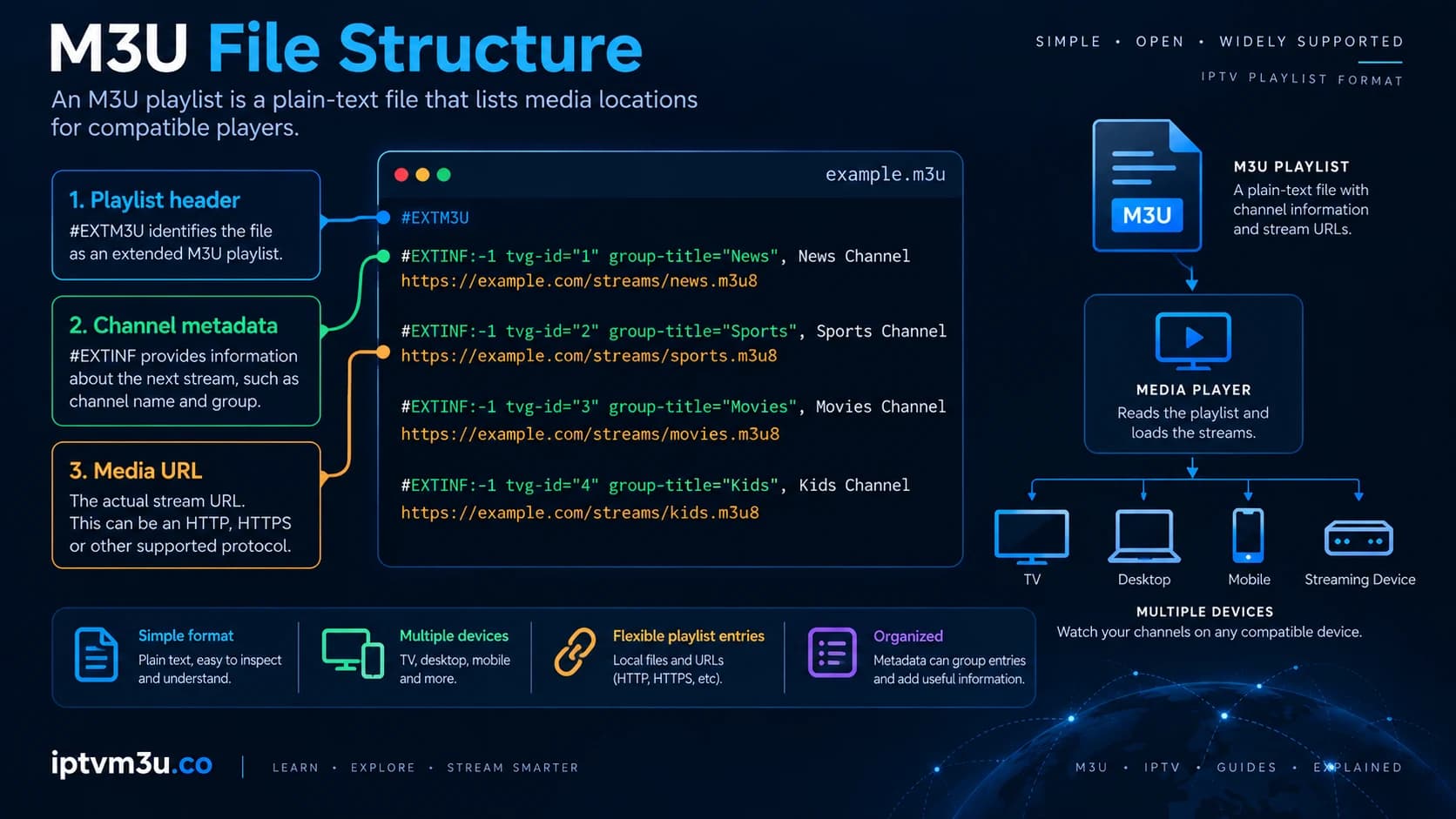
A simple playlist can contain an M3U header, an optional metadata line for an item, and the media location that follows it. More advanced playlists may include additional attributes or application-specific metadata.
#EXTM3U
#EXTINF:-1,Sample documentary
https://media.example.org/authorized/sample-documentary.mp4
M3U file structure explained
A useful way to read an M3U file is to follow its entries from top to bottom. The extended header introduces the playlist, an #EXTINF line describes the next item, and the following line identifies the media location.
For example, in the sample above, #EXTM3U marks the extended playlist, #EXTINF:-1 provides the item's duration/display-name information in the common form, and the HTTPS URL is the location the player should attempt to open.
- Header: #EXTM3U.
- Item metadata: an #EXTINF line describing the following entry.
- Media location: the local path or URL on the next line.
- Additional attributes: optional metadata whose support depends on the playlist convention and player.
What #EXTM3U and #EXTINF mean
#EXTM3U is commonly used as the extended-playlist header. #EXTINF describes the item that follows, including a duration value and a display name in the common form. The next line contains the media location.
The exact metadata supported by a player can vary. Do not assume that every application understands every extended attribute simply because it appears in an M3U file.
- #EXTM3U: identifies an extended playlist in many implementations.
- #EXTINF: commonly describes the next media item.
- Media location: the local path or URL the player should attempt to open.
- Additional metadata: may be supported by specific players or playlist conventions.
M3U files can point to different locations
An entry can point to local media or to a remote resource that your player is authorized to access. The playlist itself does not contain permission to use the referenced media.
- Local file paths for a personal media library.
- File URLs such as file:/// when supported by the player.
- HTTPS URLs for remote media or playlist resources.
- Other locations supported by the specific player and media source.
Encoding and international characters
M3U is a text-based format, so encoding can affect how names and paths are displayed. For new playlists, UTF-8 is a sensible default when supported by the target player. M3U8 explicitly identifies a UTF-8 playlist and is common when Unicode handling matters.
If accents or non-Latin characters appear incorrectly, inspect the file's actual encoding and the player's documented import behavior before rewriting the names.
M3U vs. M3U8
M3U and M3U8 are closely related playlist forms. M3U8 identifies UTF-8 text, while M3U is the broader playlist name. M3U8 is also commonly encountered in HTTP Live Streaming, but an .m3u8 extension by itself does not prove that a resource is an HLS media stream.
For HLS-specific behavior, use the HLS specification and the documentation for the player or streaming system involved.
How a player uses an M3U file
A player first reads the playlist text and builds its internal list of entries. When you select an item, it attempts to open the corresponding media location using whatever protocols and formats it supports.
This explains why a playlist can load while one item fails: parsing the text and retrieving the referenced media are separate steps.
A simple M3U validation workflow
Validate the playlist in small steps before changing several variables at once. This helps separate a formatting problem from a media-source or player problem.
- Open the file as plain text and confirm the expected M3U header and entry structure.
- Test one known-good local or authorized media entry first.
- Add one or two additional entries and confirm the player still parses the list.
- If a remote URL is involved, check the returned response separately from the playlist syntax.
- Keep the last known-working copy so you can compare changes without rebuilding the playlist from scratch.
Common M3U problems
When a playlist does not behave as expected, start with a small test file and inspect the text. Look for missing lines, malformed paths or URLs, unexpected characters, and media locations that are no longer available.
- The file is not plain text.
- The media location contains a typo or truncated URL.
- The file encoding does not match the player's expectations.
- An individual media source is offline, restricted, or expired.
- The player does not support the referenced media or protocol.
Further reading
Sources and documentation
Quick answers
Common questions
Is M3U a media format?
No. M3U is a playlist format. It lists media locations and optional metadata; the referenced audio or video uses its own media format.
What is an M3U file used for?
It is used to organize media entries so compatible software can read them as a playlist and attempt to open the referenced locations.
What is an M3U playlist?
An M3U playlist is a collection of media entries represented in the M3U text format. It can list local files or remote media locations and may include metadata that a compatible player uses to label or organize those entries.
What does #EXTINF mean?
#EXTINF is commonly used to describe the media item on the following line, including duration and a display name. Supported attributes can vary between playlist conventions and players.
Can I edit an M3U file in Notepad or another text editor?
Yes. A plain-text editor is suitable for inspecting and editing a small M3U playlist. Save it using an encoding and extension supported by your player.